Make Traefiks log available for CrowdSec in Docker

Hello,

I’m trying to set up Traefik with Crowdsec which need the Traefik logs to work, but unfortunately I can’t seem to do it in the correct way. I’ve have to admit that this is not my forte, to put it bluntly I’m a noob. I’m using Unraid with docker containers so no docker compose. My installation of Traefik is based on Ibracorps instruction and is since Monday updated to the latest version and Traefik appears to more or less run as a clock (I have a warning in the logs that I’ll try to fix when I’m done with this). I also looked at Ibracorps old clip for Crowdsec and Jims garage which is for the updated version of Traefik and his Crowdsec installation to find some guidance.

In the Ibracorp.ios docs for the Traefik installation they define the logs like this:

log:
level: INFO
format: json

accessLog:
format: json

So I copied Jims Garage:

log:

level: "INFO"

filePath: "/var/log/traefik/traefik.log"

accessLog:

filePath: "/var/log/traefik/access.log"

I first created a path in Traefiks container like this:

Name: Logs

Container Path: /logs

Host Path: /var/log/traefik/ (and yes there is a folder named traefik in /var/log/)

Which do not result in any logs in the container folder.

When I’m instead do it like this:

Name: Logs

Container Path: /logs

Host Path: /mnt/user/appdata/traefik/logs

And change accordingly in the traefik.yaml

log:

level: "INFO"

filePath: ”/logs/traefik.log"

accessLog:

filePath: "/logs/access.log"

It produces logs in the correct folder, but the link to the logs in the Unraid container no longer produces any logs.

So I get feeling that I kind of can make it work, but it is the incorrect way of doing it. There is something I’m missing and I hope you understand what is wrong and can give me some guidance…

Best regards

You need to make sure that the folder you use inside the container are correctly mapped to the host to read the log files there.

To expand on what bluepuma77 said, here is the full setup for getting Traefik access logs into CrowdSec when both run as Docker containers.

1. Configure Traefik to write access logs to a file. In your Traefik static configuration (traefik.yml or command arguments):

accessLog:
  filePath: "/var/log/traefik/access.log"
  format: json

The JSON format is important because CrowdSec's Traefik parser expects it.

2. Both containers need access to the same log file. Create a shared Docker volume and mount it in both containers.

In Traefik: mount /var/log/traefik to a named volume or a host path like /opt/traefik/logs
In CrowdSec: mount the same path so it can read the log file

If you are using Unraid's Docker UI rather than compose, set the path mapping on both containers to point at the same host directory, for example /mnt/user/appdata/traefik/logs on the host mapped to /var/log/traefik in both containers.

3. Tell CrowdSec where to find the log. Create an acquisition file at /etc/crowdsec/acquis.d/traefik.yaml inside the CrowdSec container:

filenames:
  - /var/log/traefik/access.log
labels:
  type: traefik

Then install the Traefik collection in CrowdSec:

cscli collections install crowdsecurity/traefik

Restart both containers and check with cscli metrics to confirm CrowdSec is reading the log file.

Hey, sorry for the late response @RianKellyT I finally got around to change the paths. And I realised that that I’ve been a bit stupid, so super thanks for you so pedagogical turned my head right. Sometimes I just get stuck in my thinking. So did the the necessary changes. First I yet again didn’t get any logs. So I just shut down CrowdSec and decided to watch tv with my dog. For some reason I checked the logs for Traefik a couple of hours later and they were there, just out of the blue, like it needed time to realign its paths. So just now when I came home I started CrowdSec and it seems to work. I’ll finish the install tomorrow and add the bouncer and GUI. So thanks @RianKellyIT for your time! :folded_hands:I’m very grateful!

Best regards

Hello @RianKellyIT, sorry to bother you again. I was happy too soon. So I still can’t get any logs to /var/log/traefik from Traefik. So just to get to the core of the problem I erased everything that has to do with CrowdSec. My current setup locks look like this:

The Traefik static .yaml has the filepath defined like this:

log:

level: "INFO"

filePath: "/var/log/traefik/traefik.log"

format: json

accessLog:

filePath: ”/var/log/traefik/access.log"

format: json

In Traefik I first specified a path looking like this:

Name: Logs

Container Path: /var/log/traefik/

Host Path: /mnt/user/appdata/traefik/logs/

This do not produce any logs, because there are no folder in the container called /var/. So I tried to extrapolate with a comparison with how the docker compose express the volumes for Traefik for exemple in Ubuntu (/home/ubuntu/docker/traefik/logs:/var/log/traefik) the logs are defined. But when I compare that with an Unraid specific docker compose the logs volume are not defined in that file (Ibracorp.io) and the logs are specified like this in the traefik.yaml:

log:
level: INFO
format: json

accessLog:
format: json

This is fishy. I’m not sure if I’m missunderstanding the order of things. Isn’t the Traefiks yaml that says where the logs should be stored ie /var/log/traefik/ and the container path should point to the folder in Traefik? But maybe I just overthink things as per usual and misinterpret how the path works in the container GUI. But anyway I get no logs in the /var/log/traefik/ folder.

When I’m instead did it like this, just to see if it would work:

Name: Logs

Container Path: /logs

Host Path: /mnt/user/appdata/traefik/logs

And change accordingly in the traefik.yaml:

log:

level: "INFO"

filePath: ”/logs/traefik.log"

accessLog:

filePath: "/logs/access.log"

I see the log files in the log folder in Traefik, but it breaks the link to the dropdown under Traefiks logo (and in Dozzle in which I also can see the log stream from the different apps I use). I’ve tried to make sense of all of this by reading on a lot of forums and I guess you know this but by default the logs are stored in /var/lib/docker/containers/ in Unraid and its from there the dropdown fetches its running logs. And isn’t there a point to not save the logs in Traefiks directory? A Traefik user told me to look in to parsers and sent me a link to Traefik Parsers. But looking on that yaml file make my head spin.

So either I’m very mixed up or there might be a permission issue, because there are not any files in in /var/log/traefik/.

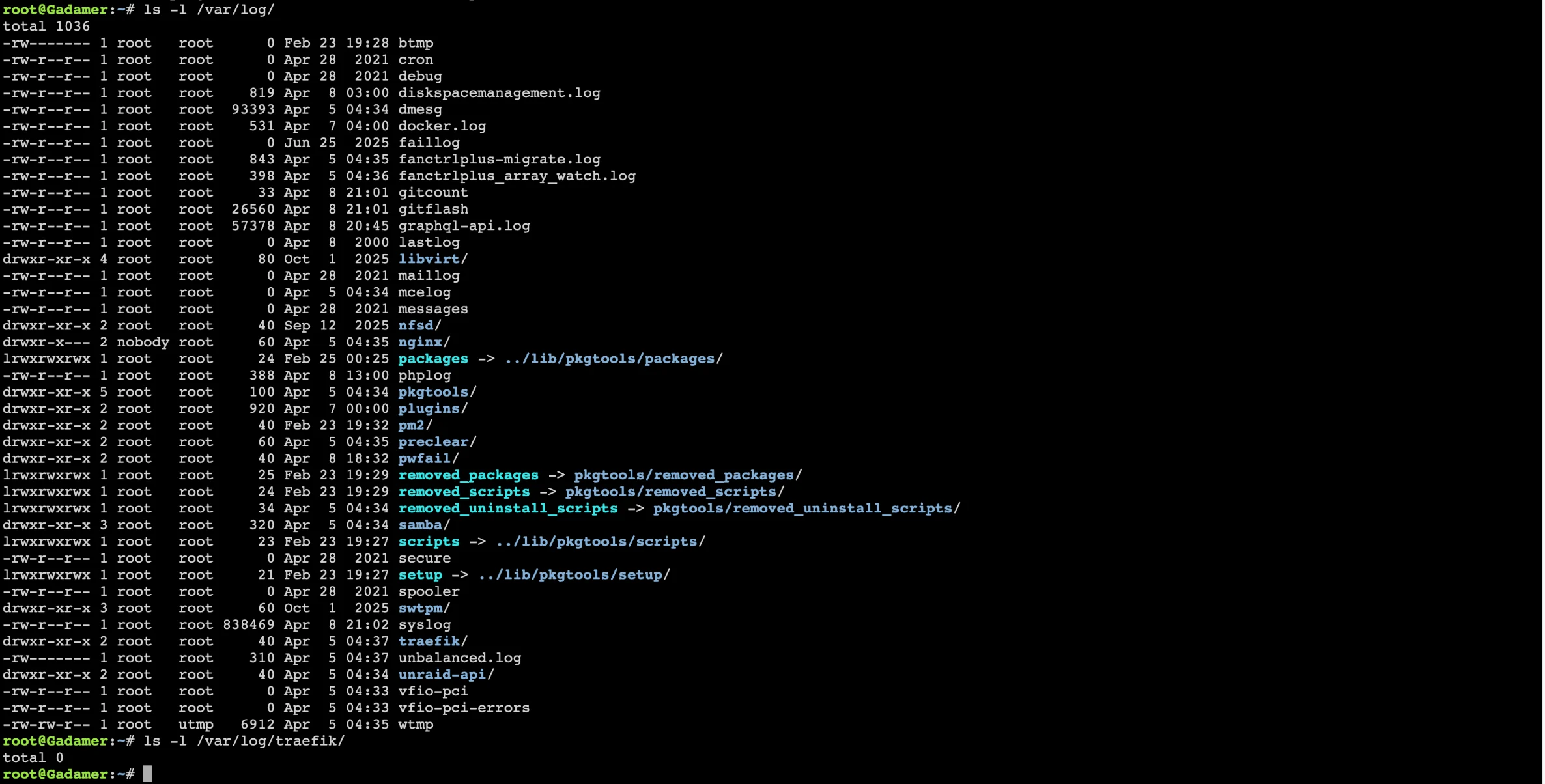
So have I messed up again? I also attach a screenshot from when I “ls -l” in to /var/log/ when Traefik is running.

Best regards

Hello, the solution was quite simple if you know where to look. With a great deal of help from one of the moderators over at CrowdSecs Discord I got connection. But one difficult issue is that the container for Unraid, is not made for Unraid, it’s only based on the standard setup for things like Ubuntu.

The Solution:

1 Like

This topic was automatically closed 3 days after the last reply. New replies are no longer allowed.